

Google is a powerful search tool, that's for sure. Google is super fast, while having an enormous index. So far it's the best search tool out there.
While I depend on Google for all my searching needs, I love the flexibility that it's giving me. I search Google all the time. It's actually easier to find my bookmarks in Google than in my browser. I even search Google to find pages from my own site that I remember creating.
What's more important is that it's an absolute time saver. As a workaholic and control freak, I am telling you, this is your most powerful productivity weapon.
First, search Google (substitute "favoritesiteX.com" with your required domain, below):
Go to this page and submit the search engine name (e.g. "my favorite sites"), paste in the Google URL string you got above, select the GET method and you are almost done. The page will require you to use a favicon for your search engine, so I use any from Google search (I am only planning to use it for my personal use after all). You can also try this generator if you get too excited.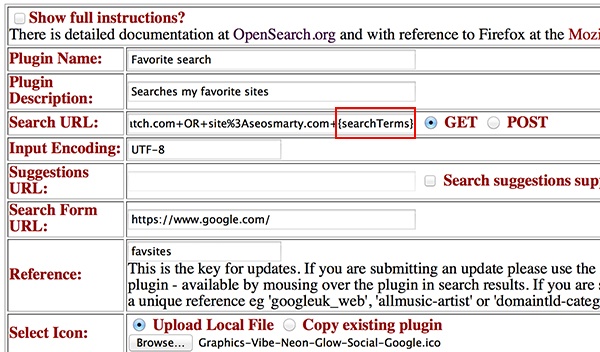 Ok, yes, that's a couple of steps, but this should only have to be done once for you to then be able to access your favorite sites search with one click of a mouse!
Test the plugin and submit it to the repository for others to use.
Now whenever you need to quickly search Google and see results only from your favorite sites, type your search terms in the Firefox search box and you are there!
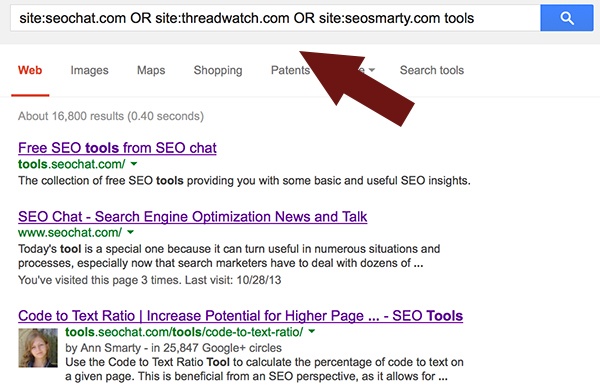
Step 1: Type your search terms: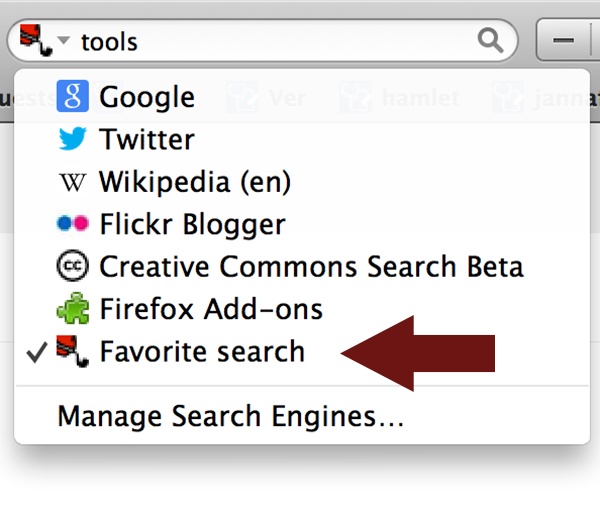 Step 2: See Google results limited to your favorite sites:
The add-on will open [site:currentdomain.com YOUR SEARCH TERM] search results in a new tab. How cool! And it takes seconds! (Well, all you need to do is to type the search phrase.)
Step one: Type your search term and click Enter: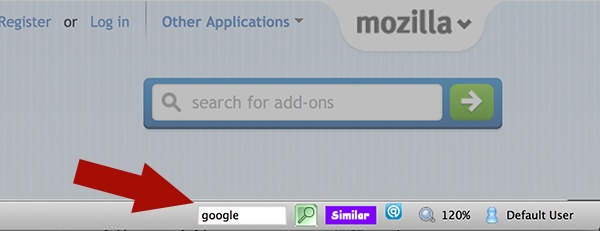 Step 2: Get Google search results from the current site
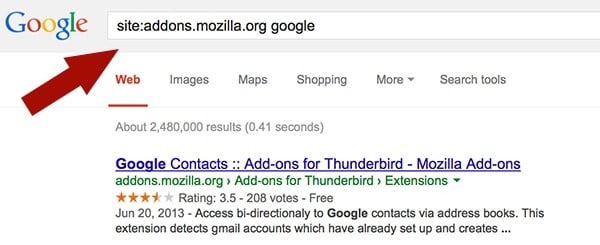 Bonus tip: Here is how you can quickly find what you've said on Google Plus using the tool above!
I do realize the irony though: I claim being independent of any site search functionality while depending on Google so heavily. I have my own personal issues with Google, but they offer a great search tool—that's something you can't deny!
While I depend on Google for all my searching needs, I love the flexibility that it's giving me. I search Google all the time. It's actually easier to find my bookmarks in Google than in my browser. I even search Google to find pages from my own site that I remember creating.
1. SITE: specific search
You are probably aware of Google's SITE: command. It lets you limit any search to one (or more) domains. I find the feature very useful for two main reasons:- It lets me pull results from my favorite sites. I know my niche and really good blogs in it, but Google seems to be worse at recognizing that. So, whenever it won't show good enough results, I force it to search within my trusted domains.
- It lets me quickly search within any site, so I never have to care to look for a third-party built-in search box on a site. (Love it or hate it, Google can follow you around the web!)
What's more important is that it's an absolute time saver. As a workaholic and control freak, I am telling you, this is your most powerful productivity weapon.
2. Create "Your favorite sites" search (Firefox search plugins)
If you find yourself searching within the same sites again and again, it makes sense to create a separate search plugin to quickly access them through Google's SITE: operator.First, search Google (substitute "favoritesiteX.com" with your required domain, below):
SITE:favoritesite1.com OR SITE:favoritesite2.com OR favoritesite3.com {searchTerms}Now copy the search results page URL string.
Go to this page and submit the search engine name (e.g. "my favorite sites"), paste in the Google URL string you got above, select the GET method and you are almost done. The page will require you to use a favicon for your search engine, so I use any from Google search (I am only planning to use it for my personal use after all). You can also try this generator if you get too excited.
Ok, yes, that's a couple of steps, but this should only have to be done once for you to then be able to access your favorite sites search with one click of a mouse!Test the plugin and submit it to the repository for others to use.
Now whenever you need to quickly search Google and see results only from your favorite sites, type your search terms in the Firefox search box and you are there!
Step 1: Type your search terms:
Step 2: See Google results limited to your favorite sites:
3. Never Look for a Search Box: Search ANY Site Using Google
Helpful tool: Goog All Sites is an absolutely amazing add-on for Firefox. It sits in your Add-ons Bar at the bottom of the screen and shows a little search box. If you land on any web page and feel like searching the current site for more information on anything, simply put your search terms in the add-on search field and click "Enter".The add-on will open [site:currentdomain.com YOUR SEARCH TERM] search results in a new tab. How cool! And it takes seconds! (Well, all you need to do is to type the search phrase.)
Step one: Type your search term and click Enter:
Step 2: Get Google search results from the current site
Bonus tip: Here is how you can quickly find what you've said on Google Plus using the tool above!I do realize the irony though: I claim being independent of any site search functionality while depending on Google so heavily. I have my own personal issues with Google, but they offer a great search tool—that's something you can't deny!